Get 10% off on your first order
Create an account today and receive a 10% off
discount code for your first purchase.
Sign up now
No thanks, I’ll pay the full price.
Logo Image
Knitup Logo
About Knitup
About Knitup
Knitup Advantage
Essentials vs Atelier
Knitup 101
How to Knitup
Materials
Essential Stitches
Mastering Jacquard
Top 10 Silhouettes
Shopify Integration
FAQ
The Loop
Sustainability
Sign Up
Log In
Account Profile
Order History
My Collection
Store
Address Book
Change Password
Log Out
Knitup Studio Get Started Contact Us
About Knitup
About Knitup
Knitup Advantage
Essentials vs Atelier
Knitup 101
How to Knitup
Materials
Essential Stitches
Mastering Jacquard
Top 10 Silhouettes
Shopify Integration
FAQ
The Loop
Sustainability
My Account
Account Profile
Order History
My Collection
Store
Address Book
Change Password
Log Out
Knitup Studio Contact Us
Processing request
Log in to your Account
Email*
Please enter a valid email.
Password*
Please enter your password.
forgot password?
Log In

Don't have an account?

Join Free Today

By logging in, you agree to our
Terms & Conditions and Privacy Policy

Register Your Account

Access our design editor.
Be the first to know everything & anything related to making better sweaters.

Email*
Please enter a valid email.
Password*
Please enter a password.
Company Website
Brand Instagram
Create Your Account

Already have an account?

Log In

By signing up, you agree to our
Terms & Conditions and Privacy Policy

Forgot Password?

Don't worry. Resetting your password is easy, just fill in your email and we'll send you a link to reset your password.

Email*
Please enter a valid email.
Send Reset Email
How Can We Help?

Find the most asked questions and answers right here.

Design
Order Production
Shipping
Price & Payment
Shopify Integration
Others
What can I use Knitup for?

With Knitup, you can design knitwear styles for women, men, and kids, as well as a selection of home accessories. The diversity of our design assets allows you to customize your design process without any strict boundaries.

How can I make sure that I like my materials before ordering?

One of the reasons we created Knitup is to help minimize waste within the supply chain of the apparel industry. This has meant that we have invested in processes and technologies – like the highest quality yarn scanning technology available and holding inventory of great quality materials – to ensure that our materials work in the way that a designer expects the first time around and to make the cost of designing an initial piece with Knitup super accessible.

This also means that we do not offer free fabric swatches prior to designing an initial style. We find that most designers do not even notice a difference with working in this way. But if you still are interested in understanding what our materials feel like, a Stitchbox, which features all the yarn qualities and colourways available at Knitup, can be purchased here.

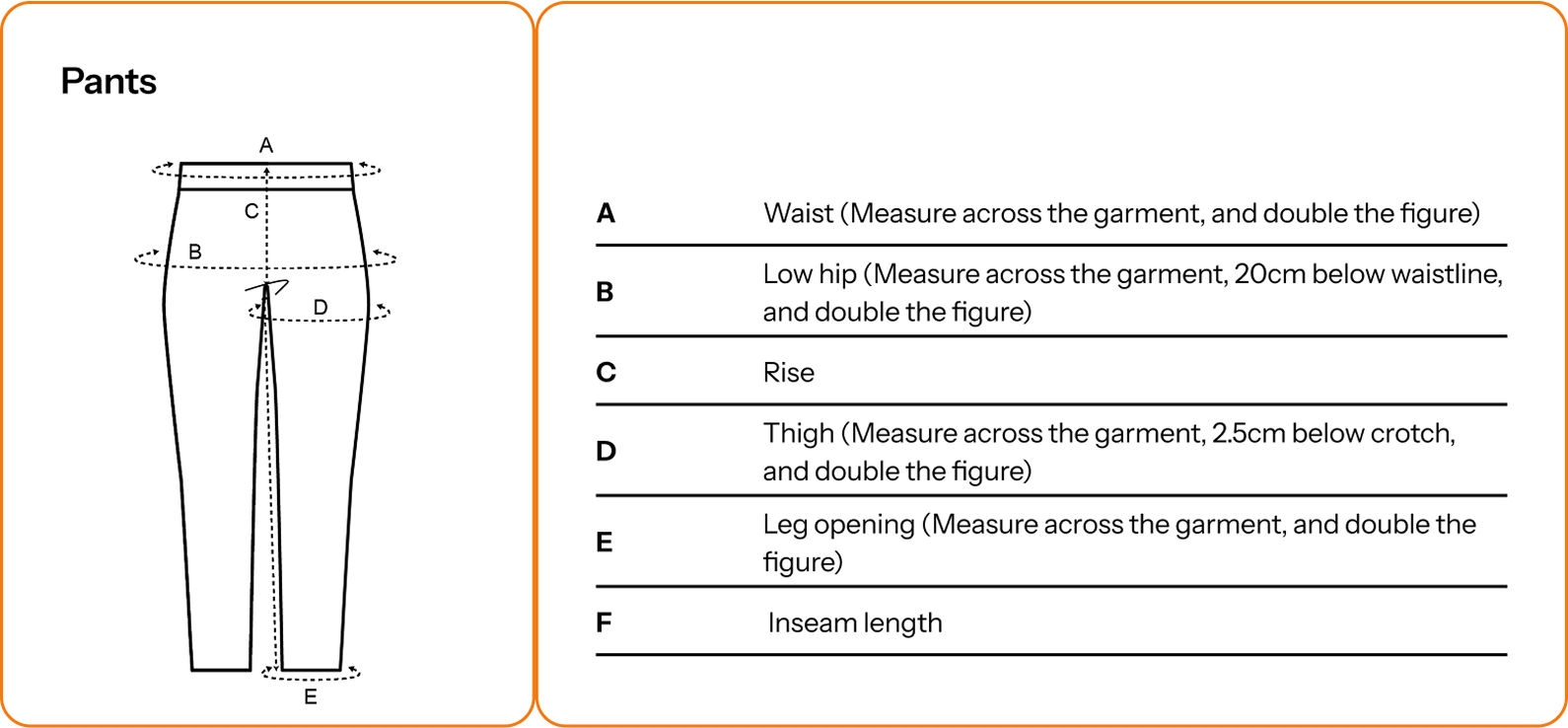
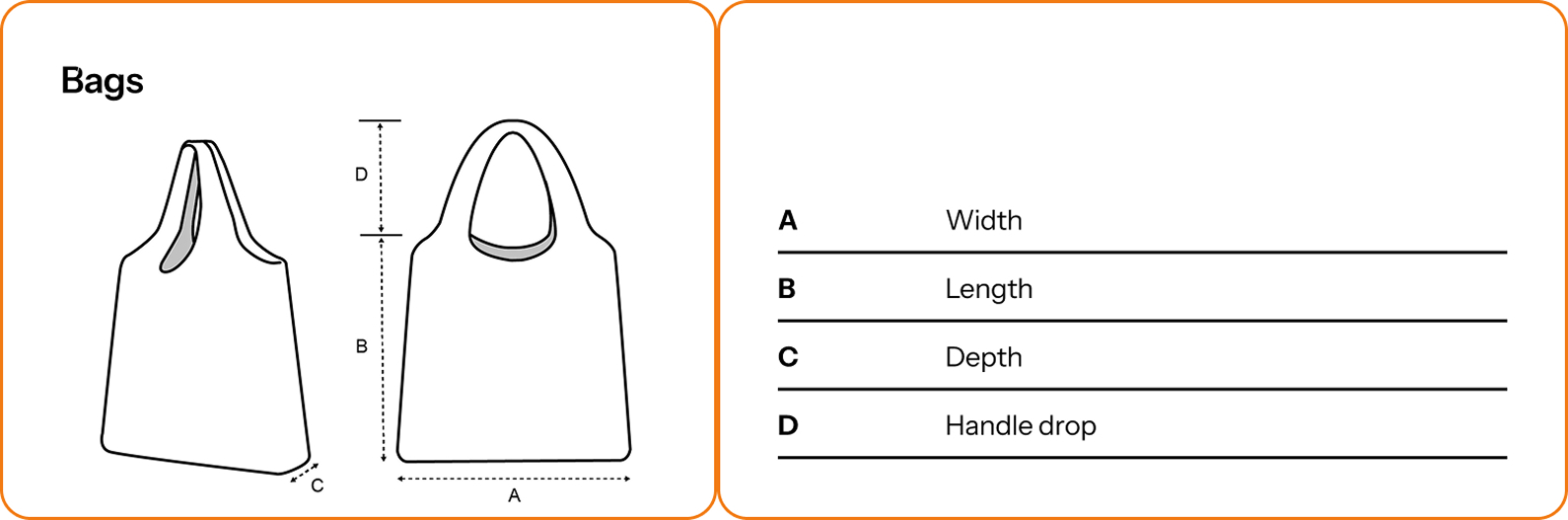
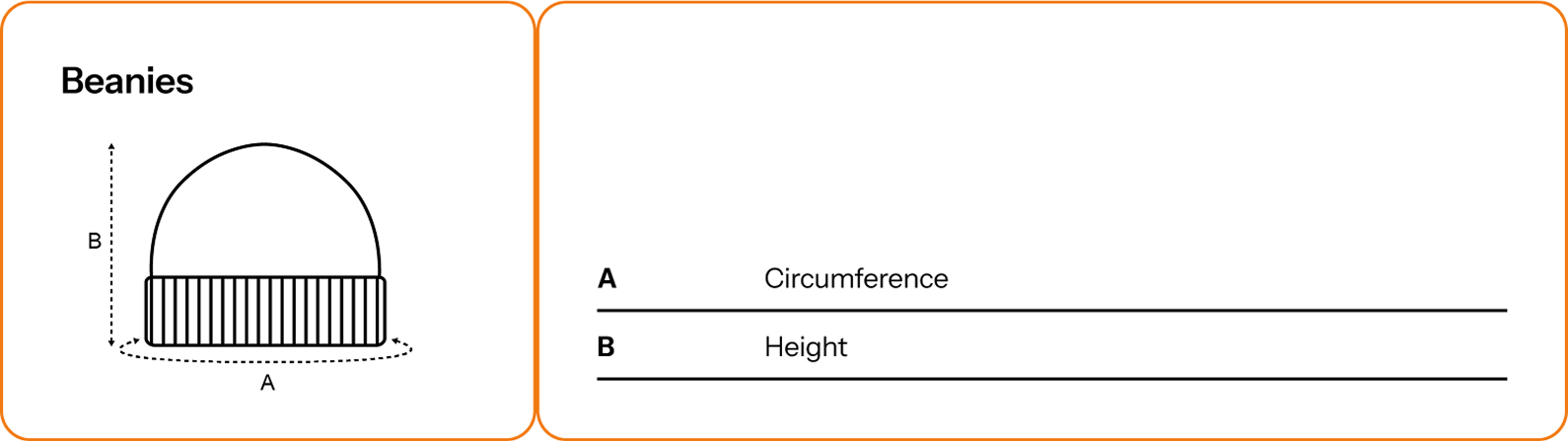
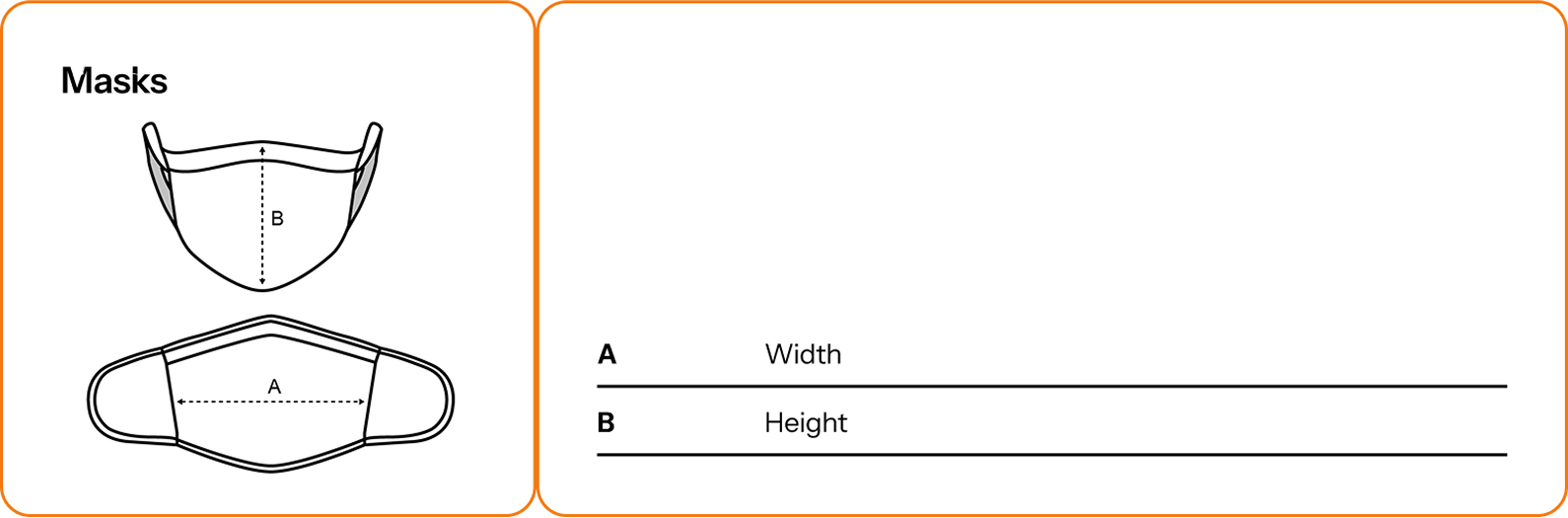
How does Knitup take its measurements?

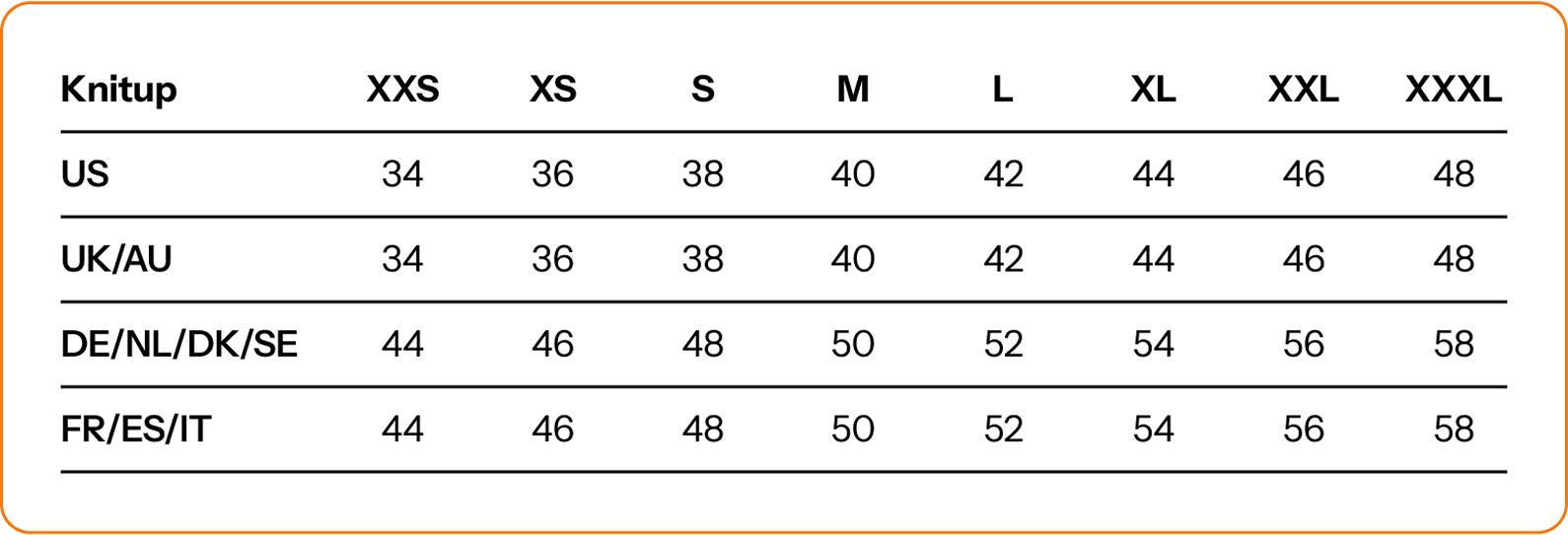
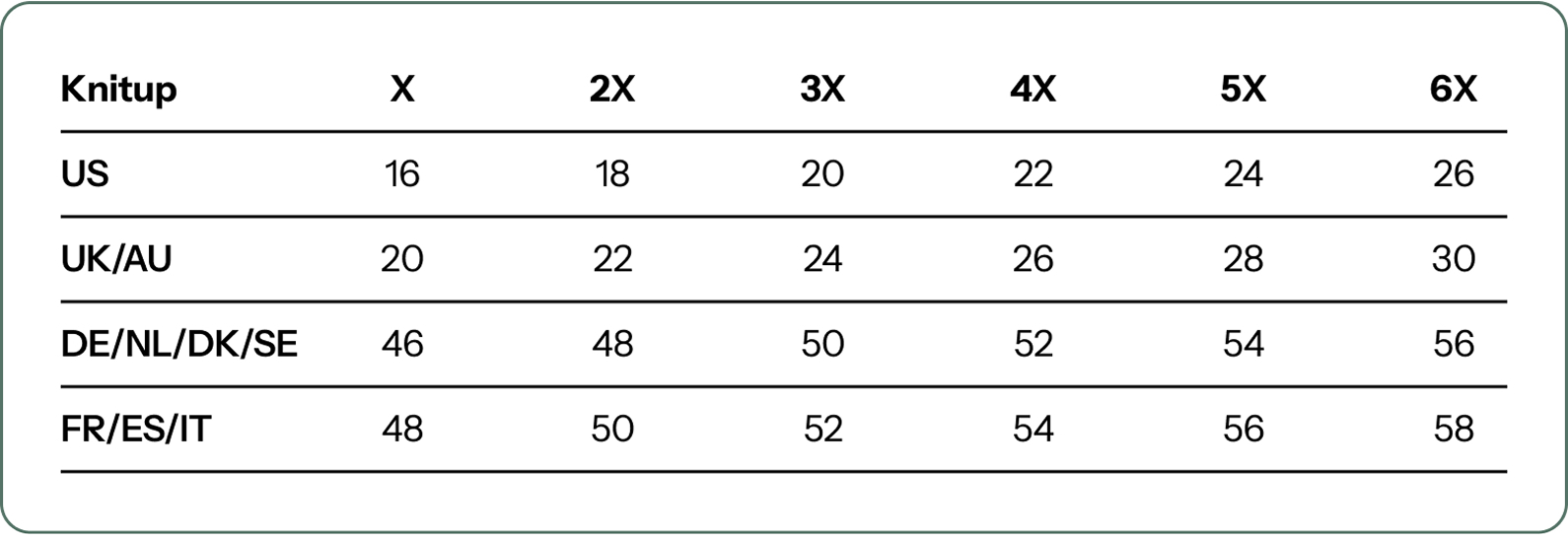
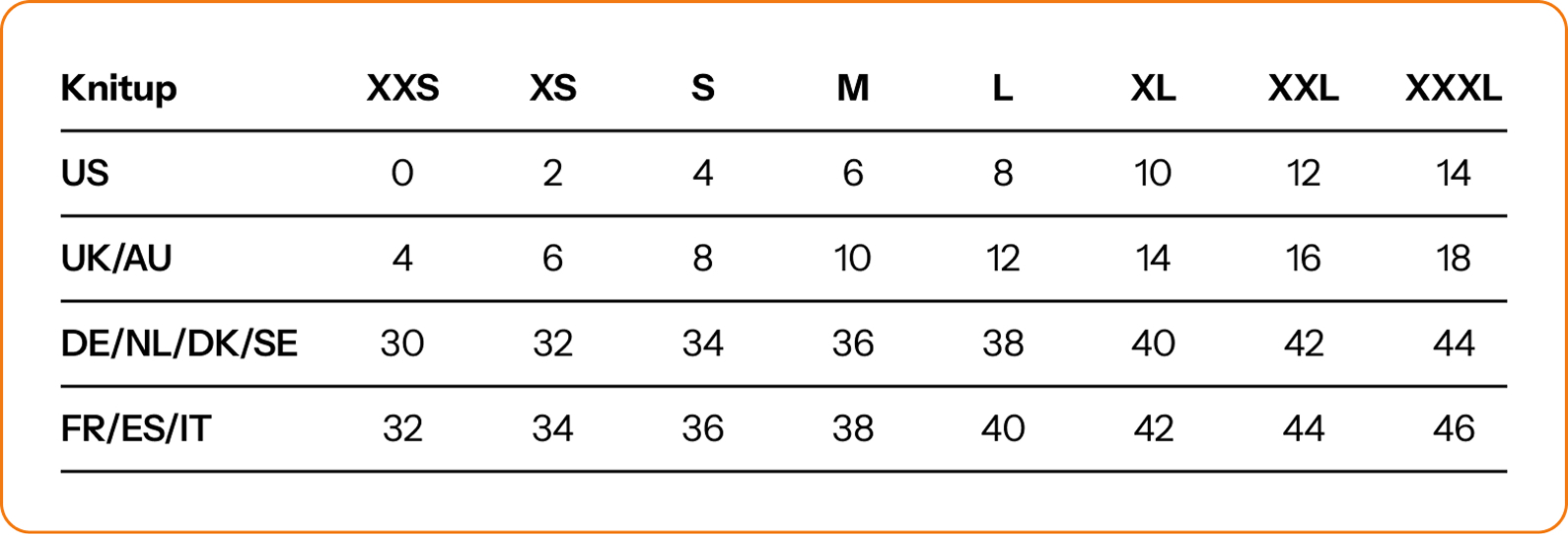
International measurement guide

Choose the right size according to your preferred size conversion charts.
Women
Men
Size Range
Curve Size - Size Range

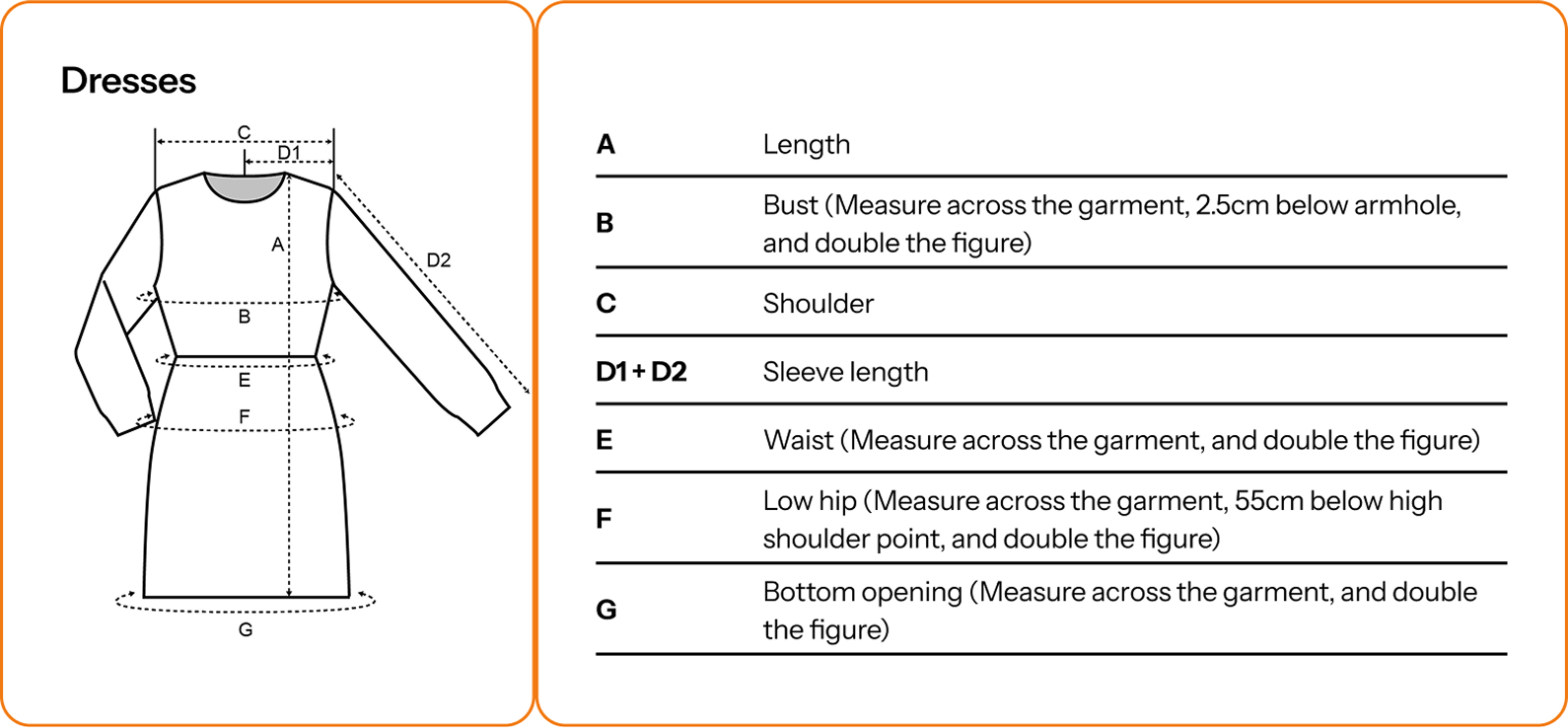
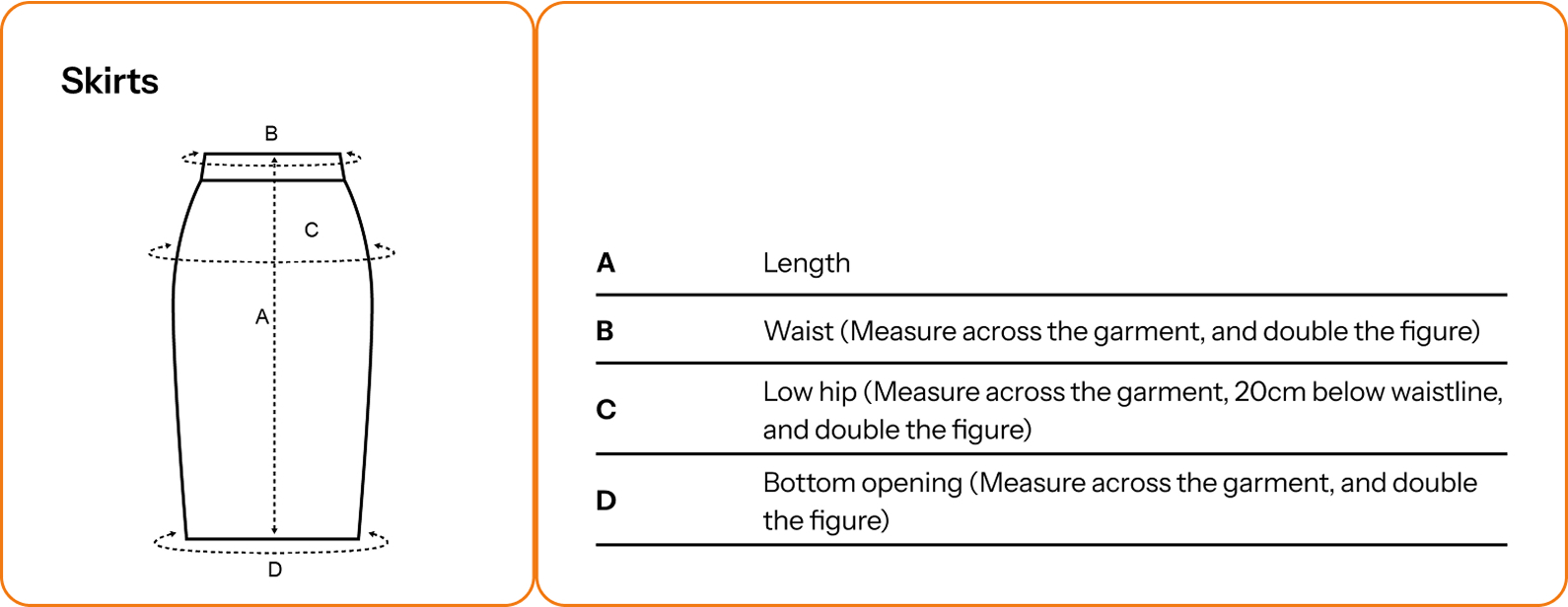
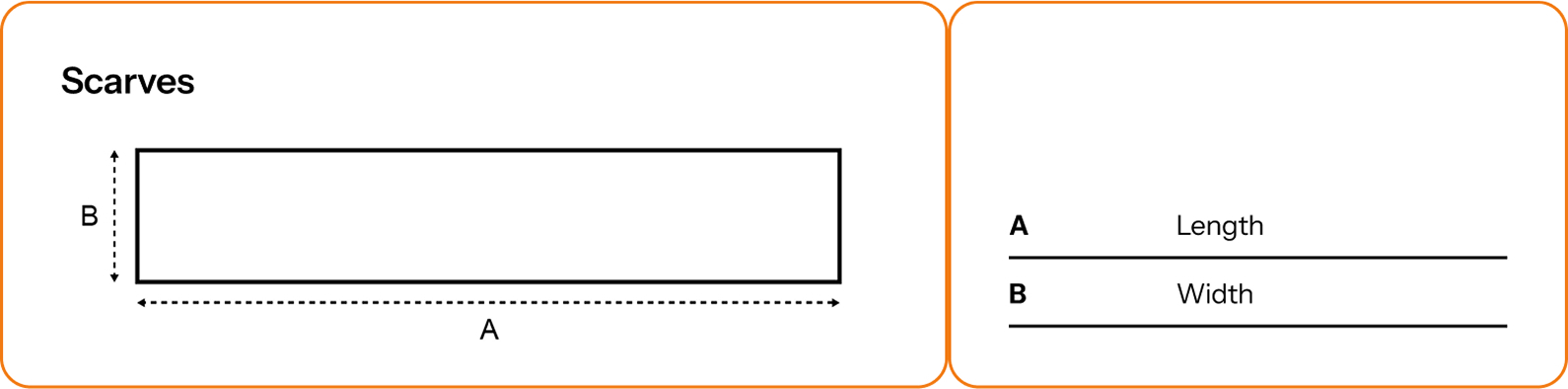
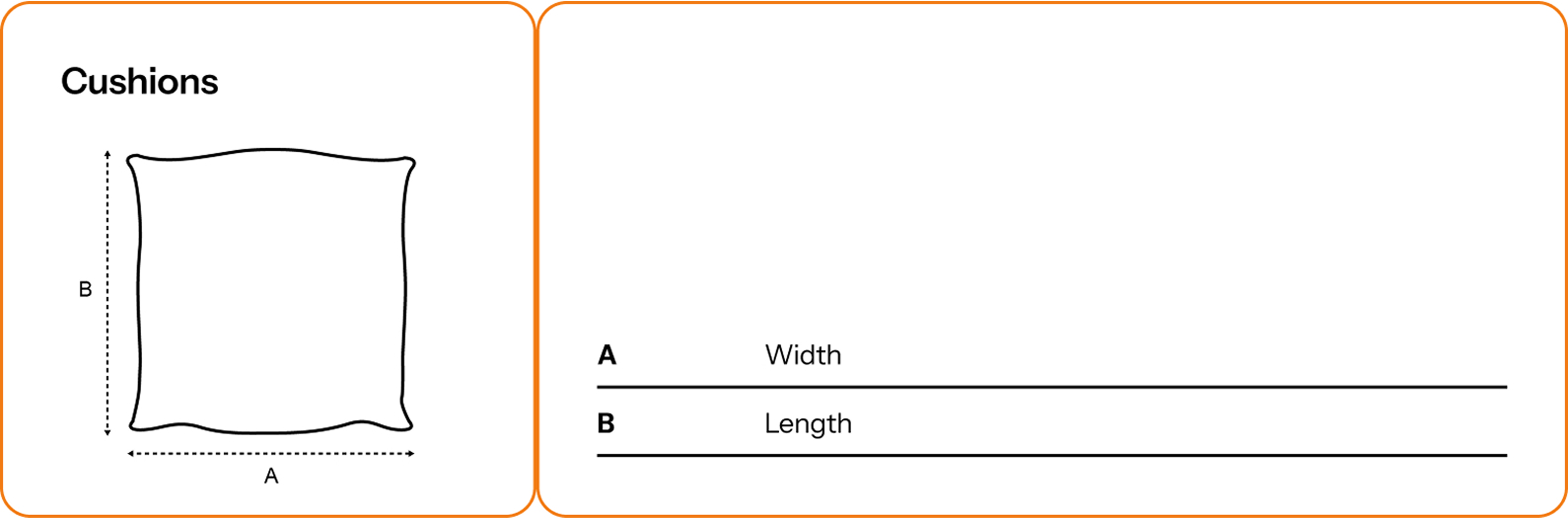
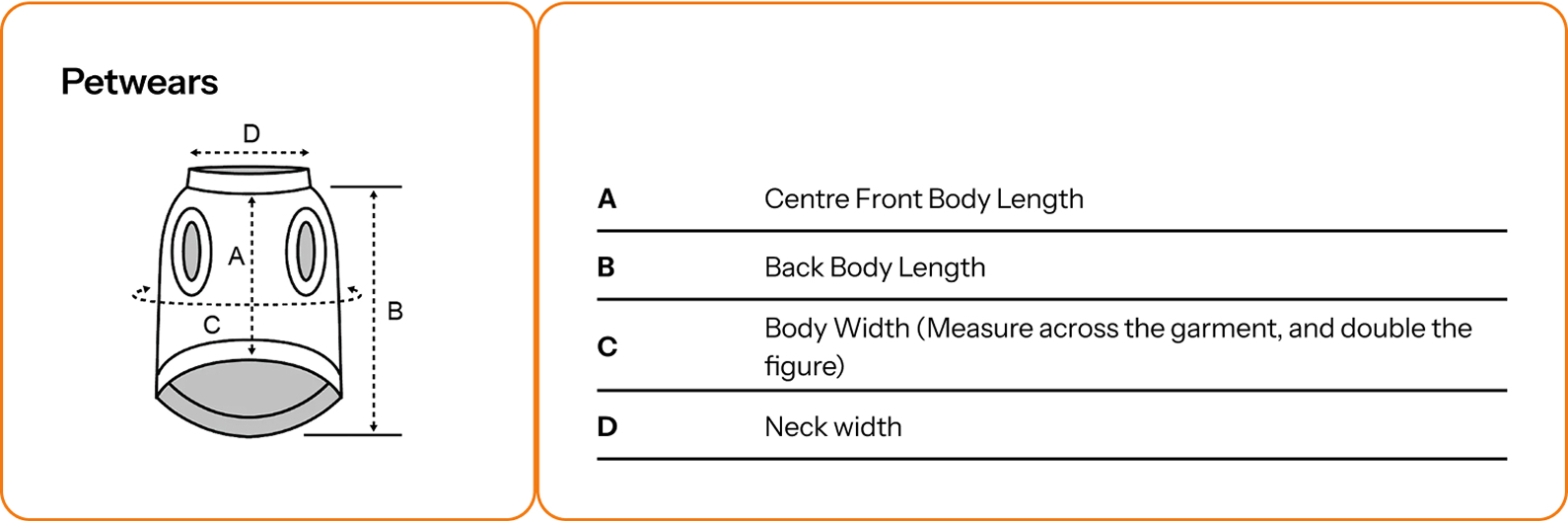
Measuring guide

Here are your step-by-step measurement guides on how to find the perfect fit.
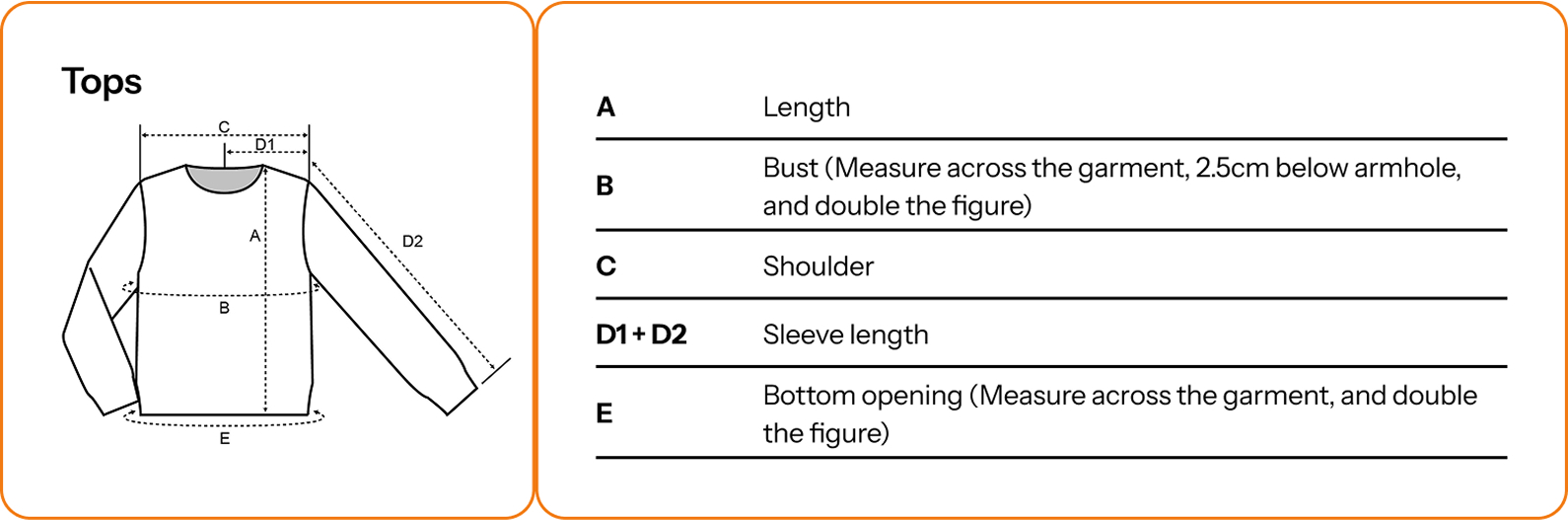
*Unlike woven fabrics, there is a standard tolerance of +/-2cm for critical flat lay measurements. Knits are meant to stretch –it’s what makes them special. The tolerance measurements of the Bust, Waist, Hip, Bottom Opening, Thigh and Leg Opening are doubled to calculate the tolerance for the full circumference around the knitwear at those points. For example, the tolerance for Bust is + or -4cm.

Can Knitup do labels?

Generic labels are included with your order. Standard label placements are as per below.
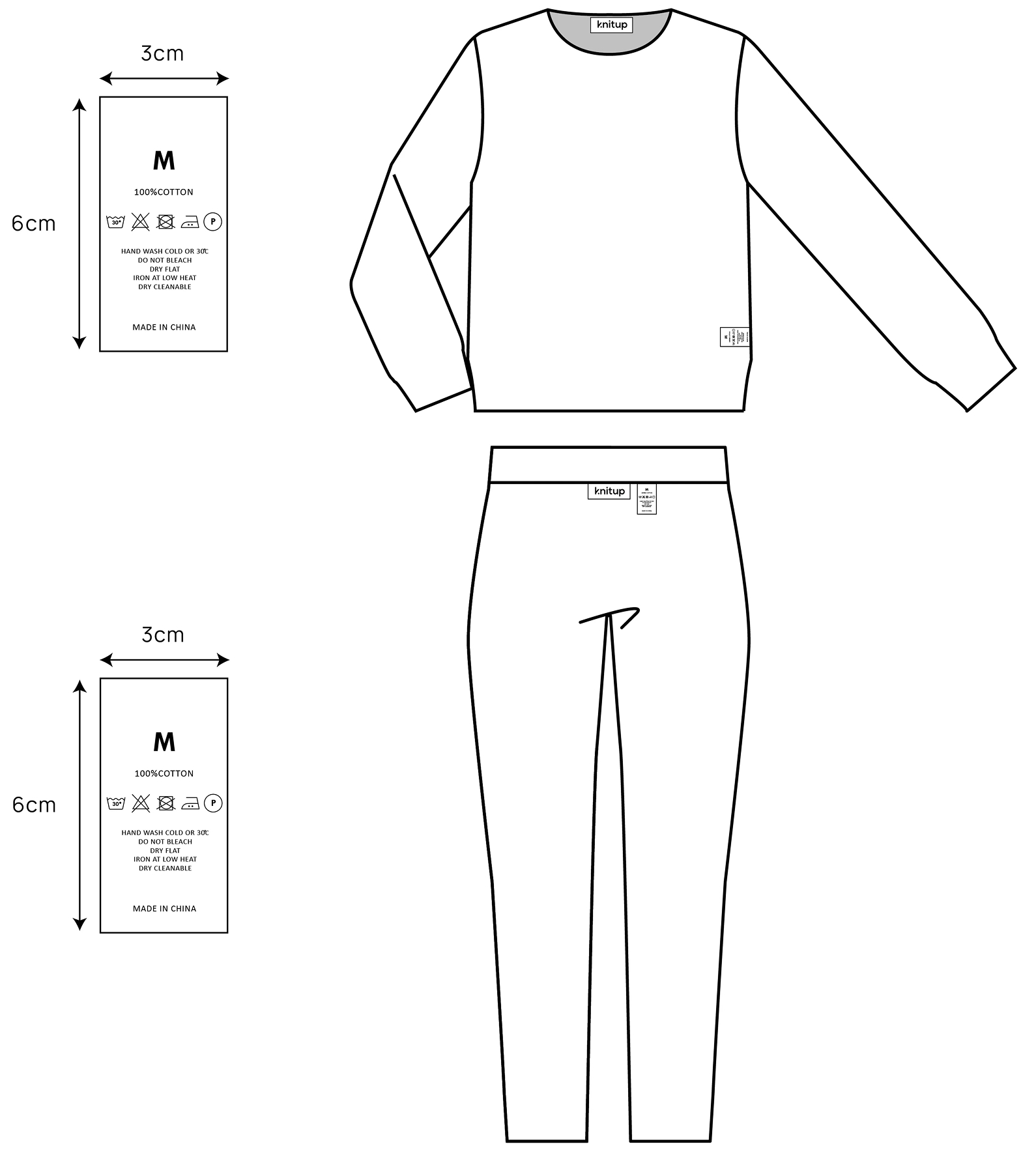
Should you seek to use custom labels, we have two options. Custom development can be done concurrent to garment production, for either polyester or damask woven cotton labels of up to six colors. There is typically an MOQ (sorrrry) of 1000pcs, but the costing is always kept reasonable. View examples of packaging, labels and hangtag options. Be sure to include a bit of a buffer – we suggest 5%.

We can also use yours for finishing. Please contact us at info@knitup.io for more details.

Are my designs protected?

Yes! Knitup is absolutely committed to making sure that, as a platform for creation, we protect designs that are produced with us. This means that your styles will not be produced for a third-party. This also means that we reserve the right to reject work that we feel infringes on the intellectual property of other designers. The world is better for your originality. Our highest priority is ensuring that Knitup remains a great place for your to be creative.

I seek to create a product that is currently not offered on Knitup. Who should I contact?

That would be our Knitup Atelier Specialists! Feel free to reach out to us at info@knitup.io . We would be happy to see if we can help.

I’m interested in Knitup Atelier, are there any minimum requirements for specialized custom creations? 

Yes! The Atelier process does require a minimum order of 100 pieces per design. 

What can I customize with Knitup Atelier?

Atelier opens up extensive customization possibilities, from the silhouette to stitch, yarn, finishing, and embellishments - you name it! Our Atelier Specialist is here to offer expert guidance and personalized consultation for your designs.

How long does it take to process an order?
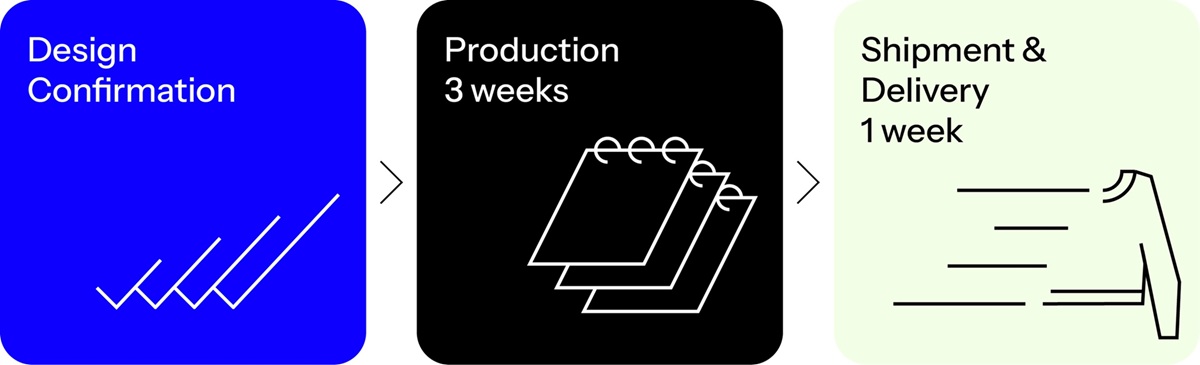
Knitup’s processes are built to help the designer quickly create a style, test it with their target market, and then replenish at a larger volume should that style be a success. For standard orders, this typically means that goods will be delivered within a month: 3 weeks for an order to be produced (barring occurrence of natural disaster, acts of God, or Chinese national holidays), and between 5-10 days for the goods to then arrive at their final destination. In the case that an order requires any customization, designers can expect to spend at least an extra week in reviewing and revising their design specifications, prior to an order being placed.

Are Knitup’s products ethically manufactured?
Yes! We take sustainability very seriously: because it matters.

If you are interested in learning more about the supplier policy to which we hold all of our manufacturing partners, you can access it here
Can I change an order after it has been placed?
Should we receive a request to change either the distribution of a given order by size or color within 24 hours an order being placed, we would be happy to honor it.
Where is Knitup based?
Knitup is headquartered in Hong Kong and produces in Southern China.
I seek to create a product that is currently not offered on Knitup. Who should I contact?
That would be our Knitup Atelier Specialists! Feel free to reach out to us at  info@knitup.io . We would be happy to see if we can help.
When will my order ship?
No more than three weeks from when your design is paid for and confirmed.
How long does shipping take?
Shipping times depend on the delivery method chosen. We ship orders using one of the following options based on your order volume and delivery address:

Courier Shipping
For orders of 1 to 300 pieces
Delivery Time: 3-5 business days after production is complete.

Air Shipping
For orders of 300 pieces and above
Delivery Time: 5-10 business days after production is complete.

Sea Shipping
For orders of 3,000 pieces and above
Delivery Time: 30-50 business days after production is complete.

How do I track my order?
Customers will be provided with a shipping number once production has been finished and goods are enroute.
What is the cost of shipping? What shipping method is used?
Shipment modes and fees may vary - we will either ship by air freight or courier depending on your order volume and delivery address. You can see shipping cost specifically for your order after you input shipping address.
What trade terms do you use?
Knitup Essentials

For shipments below 100 pieces
The trade term is Delivered Duty Unpaid (DDU).
Duties and taxes are not included at checkout. Customers are responsible for any local taxes or duties upon delivery.

For shipments above 100 pieces
You can choose at checkout between:
Delivered Duty Unpaid (DDU) - customer pays applicable duties and taxes locally.
Ex-Works (China) - you arrange your own freight forwarder to pick up from our warehouse. We will email you the warehouse location and details.

Knitup Atelier

For larger orders
Trade terms include Free on Board (FOB) and Delivered Duty Paid (DDP).
Your Atelier specialist will consult with you to provide details and confirm your preferred shipping terms.
Where does Knitup ship to?
We ship internationally.
What is Knitup’s return policy?
We want the styles that you design on Knitup to be exactly as you requested. Should you find any issue with garment quality, we would be happy to issue a refund in the first 30 days from when your garments were delivered.
How does your pricing work?
Great news - our design tool is completely free to use! For designs you would like to proceed with production, the pricing will be dependent on the complexity of your order (i.e., materials, stitches, silhouettes etc.) as well as your order volume. Don’t worry, upon checkout, we’ll provide you with an instant pricing quotation for your order.

Although prices are contingent on your own unique designs, for those who want to bulk order, we have 3 tiers of pricing. As you move up in tiers according to your order quantity per style, prices will go down. Upon checkout, you will receive an instant pricing quotation based on the tier you qualify for.

Tier 1
1 – 19 pieces per style

Tier 2
20 – 99 pieces per style

Tier 3
100 pieces and above per style
What forms of payment does Knitup take?
We accept payments by all major credit cards - i.e., VISA, Mastercard, and American Express.

For payment above US$1,000, we also accept bank transfer. Select Pay Manually upon checkout. We will send you an email with a link to your invoice and payment instructions.

Knitup processes all bank card transactions using Stripe, where users can easily pay directly using your credit card. We will not hold any credit card information on our own website.

Stripe has been audited by a PCI-certified auditor and is certified to PCI Service Provider Level 1. This is the most stringent level of certification available in the payments industry. All card numbers are encrypted at rest with AES-256. Decryption keys are stored on separate machines. None of Stripe’s internal servers and daemons can obtain plaintext card numbers but can request that cards are sent to a service provider on a static allow list. (Security at Stripe)
What terms do you typically operate on?
We require cash in advance for all transactions, be it a small order or bulk production.
For orders above USD10,000, we are happy to look at issuing split payment options but typically require that full payment of the goods be made before final shipment. For more information, please reach out to info@knitup.io
How does your pricing work?
You can connect your Shopify store from your Knitup account or Knitup Shopify app.

Connecting from Knitup account
Start by logging in or creating a free Knitup account. Click on the drop-down menu in the upper-right corner and select “Store” .
Click “Connect”.

Connecting from Knitup Shopify app
Navigate to the Shopify app store, search for “Knitup” or click here.
Next, press “Add app” → “Install app” to proceed.
How much does it cost to integrate my Shopify store with Knitup?
Integrating with Shopify is free, and designing with Knitup is also free. You can customize the designs and start selling them on Shopify at no upfront cost.
What do I need to get started?
All you need is a Shopify store and for it to be connected to your Knitup account. From there you can start your product search, import from Knitup directly to your store and sell. Install the Knitup app on the Shopify App Store and log into your Knitup account to connect.
Can I manage more than one store using one Knitup account?
Each Knitup account allows to connect with one Shopify store only.
Errors encountered when connecting a Shopify store?
Have you tried clearing out cache and cookies?
Very often this simple step will help because it will fix certain problems, like loading or formatting issues.

Are you on Shopify trial and has it maybe expired?
Make sure your store is active.

Has your Shopify account been suspended/canceled?
Make sure your store is active.

Have you deleted the Knitup app from Shopify?
You should always have the Knitup app installed in your Shopify account.

Is your Shopify store already connected to a different Knitup account?
One Shopify store may only be connected to one Knitup account.

Is your pop-up/ad block extension turned off?
Knitup requires you to disable your pop-up blocker when you’re trying to connect your Shopify store with us as the installation button will prompt a pop-up window to appear. Once you connect your store, you can turn the pop-up blocker back on. You can find instructions on how to disable the pop-up blocker here .

Are you using API?
Please check if there are any open issues occurring on the store’s provider.
How can I add my saved designs to the Shopify store?
You can add your designs to the Shopify store from your Knitup account or Knitup Shopify app.

Connecting from your Knitup account
  1. Log in to your Knitup account. Click on the drop-down menu in the upper-right corner and select “Store”.
  2. Click “Import Products” and choose the design you want to add, then press “Import to Shopify”.
  3. You can edit the product details here. Click “Save” to save your changes.
Connecting from the Knitup Shopify app
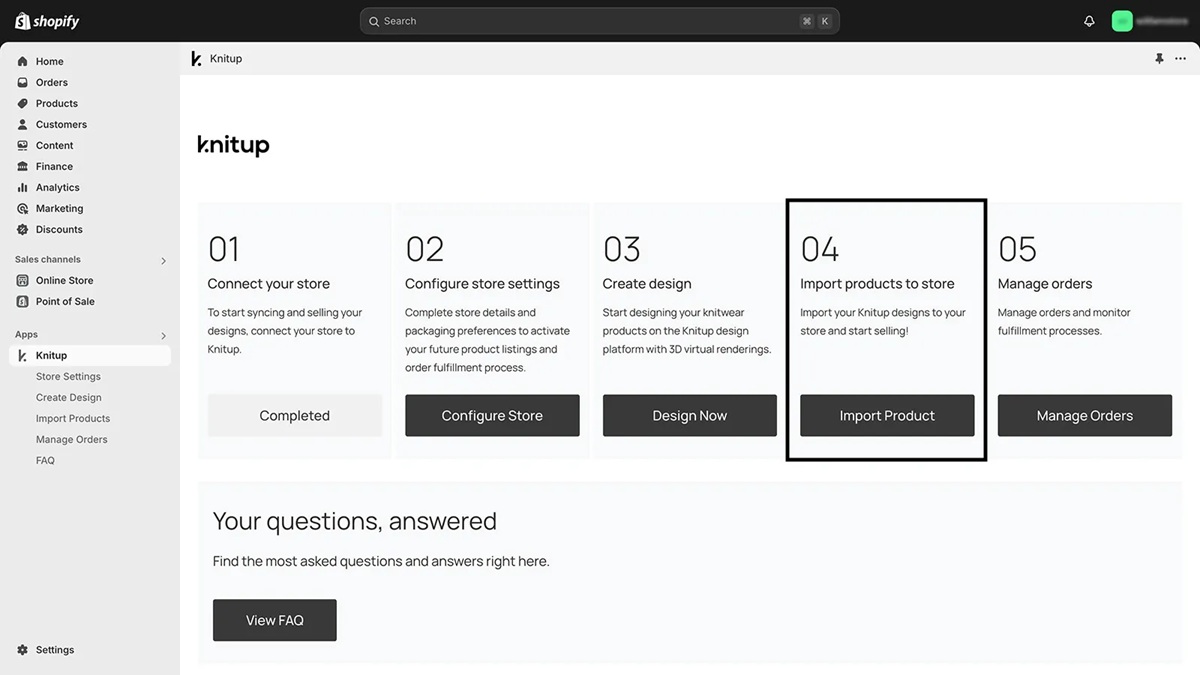
  1. Navigate to the Knitup Shopify app from your Shopify store admin.
  2. Click on “Import Product” from the app portal.
  3. Choose the design you want to add, then press “Import to Shopify”.
  4. You can edit the product details here. Click “Save” to save your changes.
Why can’t I add my saved designs to Shopify store?
Your Shopify store is currently unavailable
Your store could become unavailable if you were using a free trial (without selecting a payment plan), and it has expired. There may also be other reasons associated with Shopify.

Log in to your Shopify account to check what is the status of the store. If you were using a free trial, proceed by picking a Shopify payment plan and adding a payment method.

If you had already picked a Shopify plan and added a payment method, and yet the store appears to be unavailable, reach out to Shopify support for further assistance.

Your Shopify store is password-protected
When Shopify stores have a password in place before launching, they show an “Opening soon” message. This can lead to problems with publishing products.

To remove the password page, follow these steps:
  1. From your Shopify admin, go to “Online Store” → “Preferences”.
  2. Go to the “Password protection” area.
  3. Uncheck “Enable password”.
  4. Click “Save”.
Your daily variant publishing limit has been exceeded
Once your store reaches a total of 50,000 published variants, a rate limit takes effect. Once it does, there is a limit of 1000 variants created per day. This can result in a failed publishing attempt on Knitup side in case the product happens to exceed this number of variants.

In order to get rid of this limit, you can upgrade to the Shopify plus plan .
How can I edit imported designs?
We want to ensure that the design you added to the store will not be interrupted. So, it is not editable before disconnecting it from your Shopify store.
However, you can duplicate and edit the design on the copied version. After that, you can add the modified design to your store.

Within your Knitup Account, access “My Collection” . Select the “Duplicate Design” option to create a copy of your imported design. You can then make the necessary edits to this duplicate.

To replace the original design with the edited version, add the edited design to your store and subsequently remove the original design.

How does Knitup pricing work for Shopify orders?
The biggest advantage of Knit-on-demand is that you don't need to keep inventory. Simply design your knitwear idea with us and start selling online.

Shopify orders placed through Knitup will be charged at Tier 1 Sample pricing. To view the specific pricing for your imported designs, navigate to the "Store" section within your Knitup account. You will find a list of products in your store, each with its corresponding product cost. Please note that shipping costs will be charged separately. You may find the detailed list here .
How does the payment process work?
The amount Knitup charges for an order includes both the production cost and shipping fee. Knitup charges you only after receiving an order from your Shopify store, but before starting production.

We recommend setting up your billing information in advance to prevent production delays. Once set up, Knitup will automatically charge the total amount using your saved billing details.
What currency does Knitup charge?
All orders will be charged in US dollars (USD).
How does Knitup handle Shopify order charges?
If you have previously configured your billing settings, all new Shopify orders will be automatically added to the Knitup queue, and your default payment method will be used to process these orders.

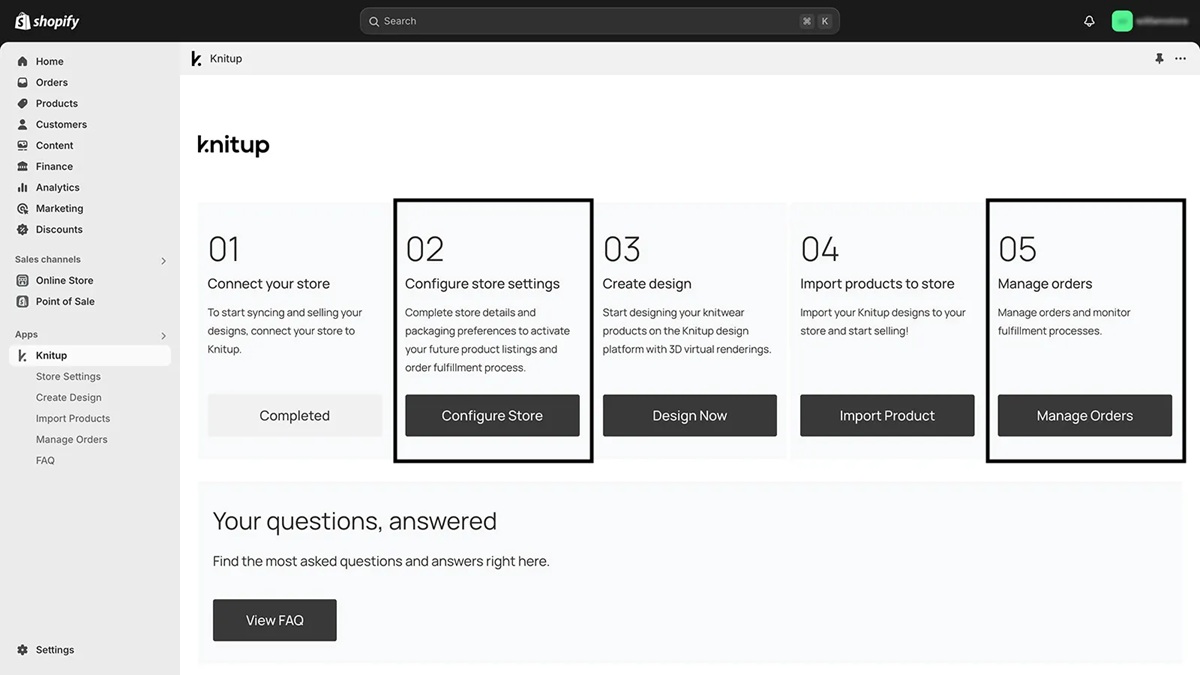
To manually pay for Shopify orders, please navigate to the “Manage Orders” section within the Knitup app on Shopify. There, you can locate your pending orders and initiate payment.

To set up billing
In the Knitup Shopify App, select the “Configure Store” option to save your billing payment from there.

How can I customize my product packaging, labels and hangtags?
You can set up your store’s default settings including packaging, main label, care label, size label, and hangtag. Knitup will send the product to your customers based on your preferences.

  1. Navigate to the “Store” section on Knitup and then choose “Store Settings”.
  2. Adjust your preferences as needed and click “Save”.
You will receive an email with follow-up instructions.
Can I test products before I sell them on my store?
Absolutely! Place a sample order on Knitup for yourself to see if the products meet your requirements or are exactly what you are looking for.
How do I set up shipping with Shopify store?
Our Shopify integration uses shipping profiles, eliminating the need for manual shipping setup for your products. The correct shipping rates will automatically be assigned upon connecting your store.

Set custom shipping rates (e.g., free shipping)
You have the option to set custom shipping rates for some or all of your products. To set up free shipping in Shopify, edit the “General Profile” and set the price to 0.00 (for one country only, e.g., the United States). Note that you can also use another shipping profile to enable free shipping, in case you are using multiple shipping profiles within your store.

In Knitup, you will still be charged with shipping costs as usual.
What happens when an order contains both a product fulfilled by Knitup, and a product not fulfilled by Knitup?
Knitup will only fulfill the items you have synced up with Knitup. So once the order ships, the status will be listed as “fulfilled” only for the synced part of the order.

Note: Your order might appear as partially fulfilled in Shopify until you manually mark the rest of the items as shipped.
Does Shopify know when Knitup shipped products?
Yes, we forward this information to Shopify. If you use Shopify built in shipping notifications emails, this will also trigger Shopify shipping notification email to your client.
How long does it take to process a Shopify order?
In general, processing a Shopify order for a knit-on-demand product typically takes about 3 weeks for production. After that, you should allow an additional 1 week for shipping. You can expect the entire process, from order placement to delivery, to take approximately 4 weeks.
Can I cancel a Shopify order on Knitup?
Knitup is a knit on-demand design platform and manufacturer, so every product is uniquely made to order. Once the product is in production, it becomes non-refundable and can not be cancelled. For assistance, please contact info@knitup.io
Can I get a bulk order discount?
We welcome bulk orders! For more details, please contact info@knitup.io
Is it necessary to collect my customers' phone numbers?
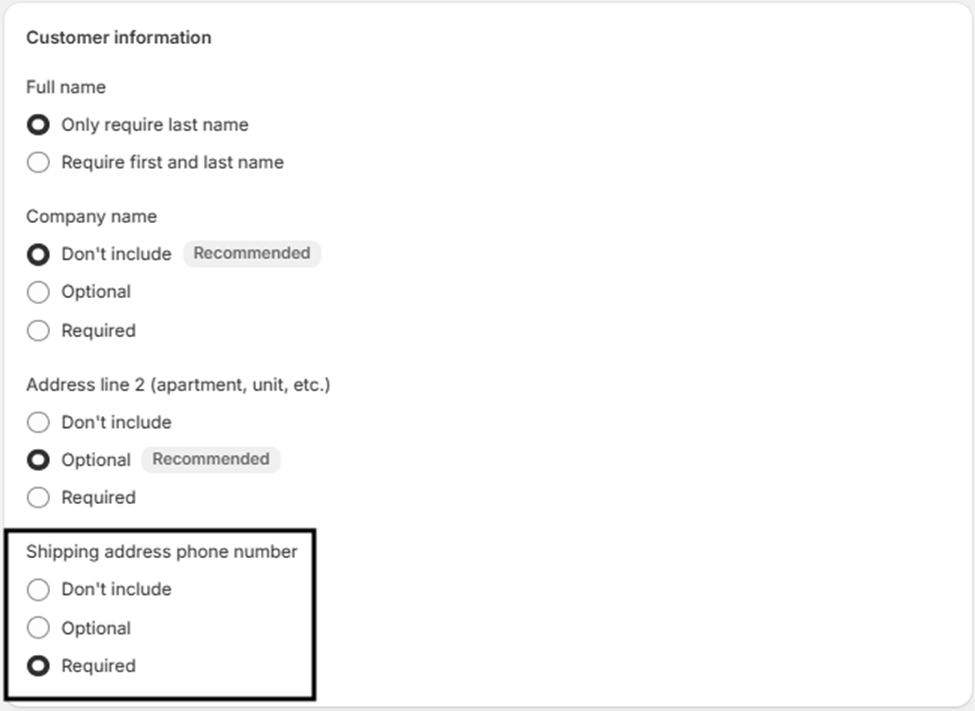
Yes, it is essential for the courier. To ensure smooth delivery, please enable the “Shipping address phone number” option and set it to “Required”.
You can set this up from the Shopify admin by going to Settings → Checkout → Customer Information

I am working with the new Knitup Studio, but there appears to be a significant lag or freeze when attempting to customize. What should I do?
The instant 3D preview is a powerful feature we proudly offer in our one-of-a-kind Knitup Studio. We suggest you adjust the GPU settings of your computer to enhance the user experience.

Windows
  1. Open "Windows Settings" --> Click "System" and select "Display".
  2. Scroll down and find "Graphics settings" under Multiple displays.
  3. On the "Graphic performance preference" page, you can adjust your graphics preference when using a specific app. Click "Browse" and select your system browser. (We recommend using Google Chrome to navigate our platform)
  4. Click "Options" under your selected browser and choose "High performance" for optimized performance.
  5. Restart the browser for your changes to take effect.

MacOS
You can change graphics settings if your computer model has two graphics systems. The "automatic graphics switching" option is turned on by default to allow your computer to automatically switch to the best graphics system for the applications running on your computer.
Follow the steps below to use the higher-performance graphics system at all times,
  1. Choose Apple menu --> "System Preferences".
  2. Click "Battery" --> Click the Battery tab.
  3. Deselect the automatic graphics switching checkbox.
  4. Restart the browser for your changes to take effect.
I want to collaborate! Who do I get in touch with?
Us too! Especially if you are working in the areas of sustainability, technology or inclusive design.
Feel free to reach out to us directly at info@knitup.io . We try to respond to all inquiries within 24 hours, so should you not hear from us, feel free to reach out again.
I have a recommendation on how Knitup can work better.
Amazing. We would love to hear from you. Please feel free to send your feedback to info@knitup.io . We would love to learn how we can better serve you.
I still have questions; who should I contact?
If you require any further assistance, please drop an email to info@knitup.io - we’ll do our best to help!
Search
Have not found the right answer?
Feel free to contact us and we will get back to you promptly.
Contact Us
Have not found the right answer?
Feel free to contact us and we will get back to you promptly.
Contact Us

Search FAQ

Close
About Knitup
  • About Knitup
  • Knitup Advantage
  • Essentials vs Atelier
  • Sustainability
The Loop
Knitup 101
  • How to Knitup
  • Materials
  • Essential Stitches
  • Mastering Jacquard
  • Top 10 Silhouettes
  • Shopify Integration
  • FAQ
Contact Us

    © Copyright, All Rights Reserved

    Privacy Policy
    Terms & Conditions
    Instagram Facebook LinkedIn
    Knitup
    About Knitup
    Knitup Advantage
    Essentials vs Atelier
    Sustainability
    The Loop
    Knitup 101
    How to Knitup
    Materials
    Essential Stitches
    Mastering Jacquard
    Top 10 Silhouettes
    Shopify Integration
    FAQ
    Contact Us
    Privacy Policy
    Terms & Conditions
    © Copyright, All Rights Reserved

    This website stores cookies on your computer. These cookies are used to collect information about how you interact with our website and allow us to remember you. We use this information in order to improve and customize your browsing experience and for analytics and metrics about our visitors both on this website and other media. To find out more about the cookies we use, see our class="terms-conditions" href="https://home.knitup.io/privacy-policy" target="_blank"> Privacy Policy .

    If you decline, your information won't be tracked when you visit this website. A single cookie will be used in your browser to remember your preference not to be tracked.

    Accept
    Decline